 GitHub Community
PowerShell script to print the user's membership from Azure DevOps #20503
Unanswered
DianaCohen
asked this question in
GitHub Education

Replies: 0 comments
Sign up for free
to join this conversation on GitHub.
Already have an account?
Sign in to comment

Uh oh!
There was an error while loading. Please reload this page.
Uh oh!
There was an error while loading. Please reload this page.
-
You can print the user's membership by using this PowerShell script.
It will show you all the organizations, but you will see the user's details in the org the has a user at.
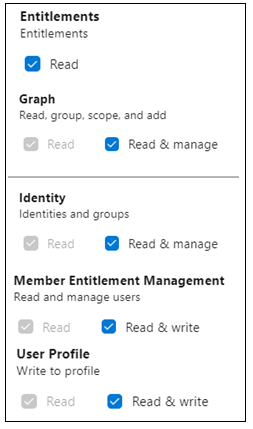
You need to create “all accessible organizations” PAT with these scopes (screenshot attached):
$token (PAT) - the Personal Access Tokens need to be filled from this URL: "https://dev.azure.com/Org_Name/_usersSettings/tokens"
$displayName - the user's Display Name can be filled from this URL: "https://admin.microsoft.com/Adminportal/Home?source=applauncher#/users"
$token (PAT) - the Personal Access Tokens need to be filled from this URL: "https://dev.azure.com/Org_Name/_usersSettings/tokens"
$token = "PAT”
$B64Pat = [System.Convert]::ToBase64String([System.Text.Encoding]::ASCII.GetBytes(":$token"))
$AzureDevOpsAuthenicationHeader = @{Authorization = 'Basic ' + $B64Pat}
$url="https://app.vssps.visualstudio.com/_apis/profile/profiles/me?api-version=6.0"
$publicAlias = $response.publicAlias
$displayName - the user's Display Name can be filled from this URL: "https://admin.microsoft.com/Adminportal/Home?source=applauncher#/users"
$displayName = "Display Name"
$url1=“https://app.vssps.visualstudio.com/_apis/accounts?memberId=$($publicAlias)&api-version=6.0”
$response1 = Invoke-RestMethod -Uri $url1 -Headers @{Authorization = "Basic $token"} -Method Get -ContentType application/json
Foreach($organization in $response1.value.accountName)
{
#Adding a space between each organization.
echo ""
echo $organization
Go through all the users over all the organizations and up to 1000 users
Beta Was this translation helpful? Give feedback.
All reactions