Welcome to SoftVC VITS Singing Voice Conversion Fork documentation!
Installation & Usage
Project Info
- Changelog
- v4.2.29 (2025-10-27)
- v4.2.28 (2025-10-26)
- v4.2.27 (2025-09-10)
- v4.2.26 (2024-07-29)
- v4.2.25 (2024-07-29)
- v4.2.24 (2024-07-18)
- v4.2.23 (2024-07-18)
- v4.2.22 (2024-07-18)
- v4.2.21 (2024-07-04)
- v4.2.20 (2024-07-04)
- v4.2.19 (2024-07-04)
- v4.2.18 (2024-07-04)
- v4.2.17 (2024-07-04)
- v4.2.16 (2024-07-04)
- v4.2.15 (2024-07-03)
- v4.2.14 (2024-07-03)
- v4.2.13 (2024-07-03)
- v4.2.12 (2024-07-03)
- v4.2.11 (2024-07-02)
- v4.2.10 (2024-07-02)
- v4.2.9 (2024-05-23)
- v4.2.8 (2024-05-22)
- v4.2.7 (2024-05-22)
- v4.2.6 (2024-05-18)
- v4.2.5 (2024-05-16)
- v4.2.4 (2024-05-16)
- v4.2.3 (2024-05-10)
- v4.2.2 (2024-05-10)
- v4.2.1 (2024-05-10)
- v4.2.0 (2024-04-11)
- v4.1.61 (2024-04-06)
- v4.1.60 (2024-04-06)
- v4.1.59 (2024-04-06)
- v4.1.58 (2024-03-25)
- v4.1.57 (2024-03-25)
- v4.1.56 (2024-03-05)
- v4.1.55 (2024-03-04)
- v4.1.54 (2024-03-03)
- v4.1.53 (2024-02-28)
- v4.1.52 (2024-02-25)
- v4.1.51 (2024-02-23)
- v4.1.50 (2024-02-22)
- v4.1.49 (2024-02-21)
- v4.1.48 (2024-02-16)
- v4.1.47 (2024-02-10)
- v4.1.46 (2024-02-08)
- v4.1.45 (2024-02-05)
- v4.1.44 (2024-02-03)
- v4.1.43 (2024-02-02)
- v4.1.42 (2024-01-30)
- v4.1.41 (2024-01-29)
- v4.1.40 (2024-01-24)
- v4.1.39 (2024-01-22)
- v4.1.38 (2024-01-11)
- v4.1.37 (2024-01-03)
- v4.1.36 (2024-01-03)
- v4.1.35 (2024-01-03)
- v4.1.34 (2024-01-03)
- v4.1.33 (2024-01-02)
- v4.1.32 (2023-11-21)
- v4.1.31 (2023-11-18)
- v4.1.30 (2023-11-16)
- v4.1.29 (2023-11-16)
- v4.1.28 (2023-11-16)
- v4.1.27 (2023-11-15)
- v4.1.26 (2023-11-14)
- v4.1.25 (2023-11-09)
- v4.1.24 (2023-11-08)
- v4.1.23 (2023-11-02)
- v4.1.22 (2023-10-30)
- v4.1.21 (2023-10-26)
- v4.1.20 (2023-10-26)
- v4.1.19 (2023-10-21)
- v4.1.18 (2023-10-21)
- v4.1.17 (2023-10-19)
- v4.1.16 (2023-10-18)
- v4.1.15 (2023-10-13)
- v4.1.14 (2023-10-13)
- v4.1.13 (2023-10-13)
- v4.1.12 (2023-10-13)
- v4.1.11 (2023-09-23)
- v4.1.10 (2023-09-17)
- v4.1.9 (2023-09-16)
- v4.1.8 (2023-09-15)
- v4.1.7 (2023-09-12)
- v4.1.6 (2023-09-06)
- v4.1.5 (2023-09-05)
- v4.1.4 (2023-09-02)
- v4.1.3 (2023-08-30)
- v4.1.2 (2023-08-28)
- v4.1.1 (2023-07-02)
- v4.1.0 (2023-06-25)
- v4.0.3 (2023-06-25)
- v4.0.2 (2023-06-14)
- v4.0.1 (2023-05-29)
- v4.0.0 (2023-05-29)
- v3.15.0 (2023-05-22)
- v3.14.1 (2023-05-07)
- v3.14.0 (2023-05-06)
- v3.13.3 (2023-05-06)
- v3.13.2 (2023-05-06)
- v3.13.1 (2023-05-04)
- v3.13.0 (2023-05-04)
- v3.12.1 (2023-04-30)
- v3.12.0 (2023-04-30)
- v3.11.2 (2023-04-30)
- v3.11.1 (2023-04-30)
- v3.11.0 (2023-04-23)
- v3.10.5 (2023-04-22)
- v3.10.4 (2023-04-21)
- v3.10.3 (2023-04-19)
- v3.10.2 (2023-04-19)
- v3.10.1 (2023-04-19)
- v3.10.0 (2023-04-18)
- v3.9.5 (2023-04-18)
- v3.9.4 (2023-04-18)
- v3.9.3 (2023-04-16)
- v3.9.2 (2023-04-16)
- v3.9.1 (2023-04-16)
- v3.9.0 (2023-04-16)
- v3.8.1 (2023-04-16)
- v3.8.0 (2023-04-15)
- v3.7.3 (2023-04-15)
- v3.7.2 (2023-04-15)
- v3.7.1 (2023-04-15)
- v3.7.0 (2023-04-14)
- v3.6.2 (2023-04-14)
- v3.6.1 (2023-04-14)
- v3.6.0 (2023-04-13)
- v3.5.1 (2023-04-13)
- v3.5.0 (2023-04-13)
- v3.4.0 (2023-04-13)
- v3.3.1 (2023-04-13)
- v3.3.0 (2023-04-13)
- v3.2.0 (2023-04-13)
- v3.1.13 (2023-04-12)
- v3.1.12 (2023-04-12)
- v3.1.11 (2023-04-12)
- v3.1.10 (2023-04-11)
- v3.1.9 (2023-04-10)
- v3.1.8 (2023-04-10)
- v3.1.7 (2023-04-09)
- v3.1.6 (2023-04-09)
- v3.1.5 (2023-04-09)
- v3.1.4 (2023-04-09)
- v3.1.3 (2023-04-09)
- v3.1.2 (2023-04-09)
- v3.1.1 (2023-04-08)
- v3.1.0 (2023-04-08)
- v3.0.5 (2023-04-08)
- v3.0.4 (2023-04-06)
- v3.0.3 (2023-04-05)
- v3.0.2 (2023-04-04)
- v3.0.1 (2023-04-03)
- v3.0.0 (2023-04-03)
- v2.1.5 (2023-04-01)
- v2.1.4 (2023-03-31)
- v2.1.3 (2023-03-31)
- v2.1.2 (2023-03-28)
- v2.1.1 (2023-03-27)
- v2.1.0 (2023-03-27)
- v2.0.0 (2023-03-27)
- v1.4.3 (2023-03-26)
- v1.4.2 (2023-03-26)
- v1.4.1 (2023-03-26)
- v1.4.0 (2023-03-26)
- v1.3.5 (2023-03-26)
- v1.3.4 (2023-03-25)
- v1.3.3 (2023-03-25)
- v1.3.2 (2023-03-24)
- v1.3.1 (2023-03-24)
- v1.3.0 (2023-03-23)
- v1.2.11 (2023-03-23)
- v1.2.10 (2023-03-23)
- v1.2.9 (2023-03-23)
- v1.2.8 (2023-03-22)
- v1.2.7 (2023-03-22)
- v1.2.6 (2023-03-22)
- v1.2.5 (2023-03-22)
- v1.2.4 (2023-03-22)
- v1.2.3 (2023-03-21)
- v1.2.2 (2023-03-21)
- v1.2.1 (2023-03-21)
- v1.2.0 (2023-03-21)
- v1.1.1 (2023-03-21)
- v1.1.0 (2023-03-21)
- v1.0.2 (2023-03-21)
- v1.0.1 (2023-03-20)
- v1.0.0 (2023-03-20)
- v0.8.2 (2023-03-20)
- v0.8.1 (2023-03-20)
- v0.8.0 (2023-03-20)
- v0.7.1 (2023-03-20)
- v0.6.3 (2023-03-20)
- v0.6.2 (2023-03-19)
- v0.6.1 (2023-03-19)
- v0.6.0 (2023-03-18)
- v0.5.0 (2023-03-18)
- v0.4.1 (2023-03-18)
- v0.4.0 (2023-03-18)
- v0.3.0 (2023-03-17)
- v0.2.1 (2023-03-17)
- v0.2.0 (2023-03-17)
- v0.1.0 (2023-03-17)
- Contributing
SoftVC VITS Singing Voice Conversion Fork


A fork of so-vits-svc with realtime support and greatly improved interface. Based on branch 4.0 (v1) (or 4.1) and the models are compatible. 4.1 models are not supported. Other models are also not supported.
No Longer Maintained
Reasons
Within a year, the technology has evolved enormously and there are many better alternatives
Was hoping to create a more Modular, easy-to-install repository, but didn’t have the skills, time, money to do so
PySimpleGUI is no longer LGPL
Using Typer is getting more popular than directly using Click
Alternatives
Always beware of the very few influencers who are quite overly surprised about any new project/technology. You need to take every social networking post with semi-doubt.
The voice changer boom that occurred in 2023 has come to an end, and many developers, not just those in this repository, have been not very active for a while.
There are too many alternatives to list here but:
RVC family: IAHispano/Applio (MIT) (actively maintained), fumiama’s RVC (AGPL) and original RVC (MIT) (no longer maintained)
VCClient (MIT etc.) offers web-based GUI for real-time conversion but not quite actively maintained.
fish-diffusion tried to be quite modular but not actively maintained.
yxlllc/DDSP-SVC - new releases are issued occasionally. yxlllc/ReFlow-VAE-SVC
coqui-ai/TTS was for TTS but was partially modular. However, it is not maintained anymore, unfortunately.
Elsewhere, several start-ups have improved and marketed voice changers (probably for profit).
Updates to this repository have been limited to maintenance since Spring 2023. ~~It is difficult to narrow the list of alternatives here, but please consider trying other projects if you are looking for a voice changer with even better performance (especially in terms of latency other than quality).~~ > ~~However, this project may be ideal for those who want to try out voice conversion for the moment (because it is easy to install).~~
Features not available in the original repo
Realtime voice conversion (enhanced in v1.1.0)
Partially integrates
QuickVCFixed misuse of
ContentVecin the original repository.[2]More accurate pitch estimation using
CREPE.GUI and unified CLI available
~2x faster training
Ready to use just by installing with
pip.Automatically download pretrained models. No need to install
fairseq.Code completely formatted with black, isort, autoflake etc.
Installation
Option 1. One click easy installation

This BAT file will automatically perform the steps described below.
Option 2. Manual installation (using pipx, experimental)
1. Installing pipx
Windows (development version required due to pypa/pipx#940):
py -3 -m pip install --user git+https://github.com/pypa/pipx.git
py -3 -m pipx ensurepath
Linux/MacOS:
python -m pip install --user pipx
python -m pipx ensurepath
2. Installing so-vits-svc-fork
pipx install so-vits-svc-fork --python=3.11
pipx inject so-vits-svc-fork torch torchaudio --pip-args="--upgrade" --index-url=https://download.pytorch.org/whl/cu121 # https://download.pytorch.org/whl/nightly/cu121
Option 3. Manual installation
Creating a virtual environment
Windows:
py -3.11 -m venv venv
venv\Scripts\activate
Linux/MacOS:
python3.11 -m venv venv
source venv/bin/activate
Anaconda:
conda create -n so-vits-svc-fork python=3.11 pip
conda activate so-vits-svc-fork
Installing without creating a virtual environment may cause a PermissionError if Python is installed in Program Files, etc.
Install this via pip (or your favourite package manager that uses pip):
python -m pip install -U pip setuptools wheel
pip install -U torch torchaudio --index-url https://download.pytorch.org/whl/cu121 # https://download.pytorch.org/whl/nightly/cu121
pip install -U so-vits-svc-fork
Notes
If no GPU is available or using MacOS, simply remove
pip install -U torch torchaudio --index-url https://download.pytorch.org/whl/cu121. MPS is probably supported.If you are using an AMD GPU on Linux, replace
--index-url https://download.pytorch.org/whl/cu121with--index-url https://download.pytorch.org/whl/nightly/rocm5.7. AMD GPUs are not supported on Windows (#120).
Update
Please update this package regularly to get the latest features and bug fixes.
pip install -U so-vits-svc-fork
# pipx upgrade so-vits-svc-fork
Usage
Inference
GUI
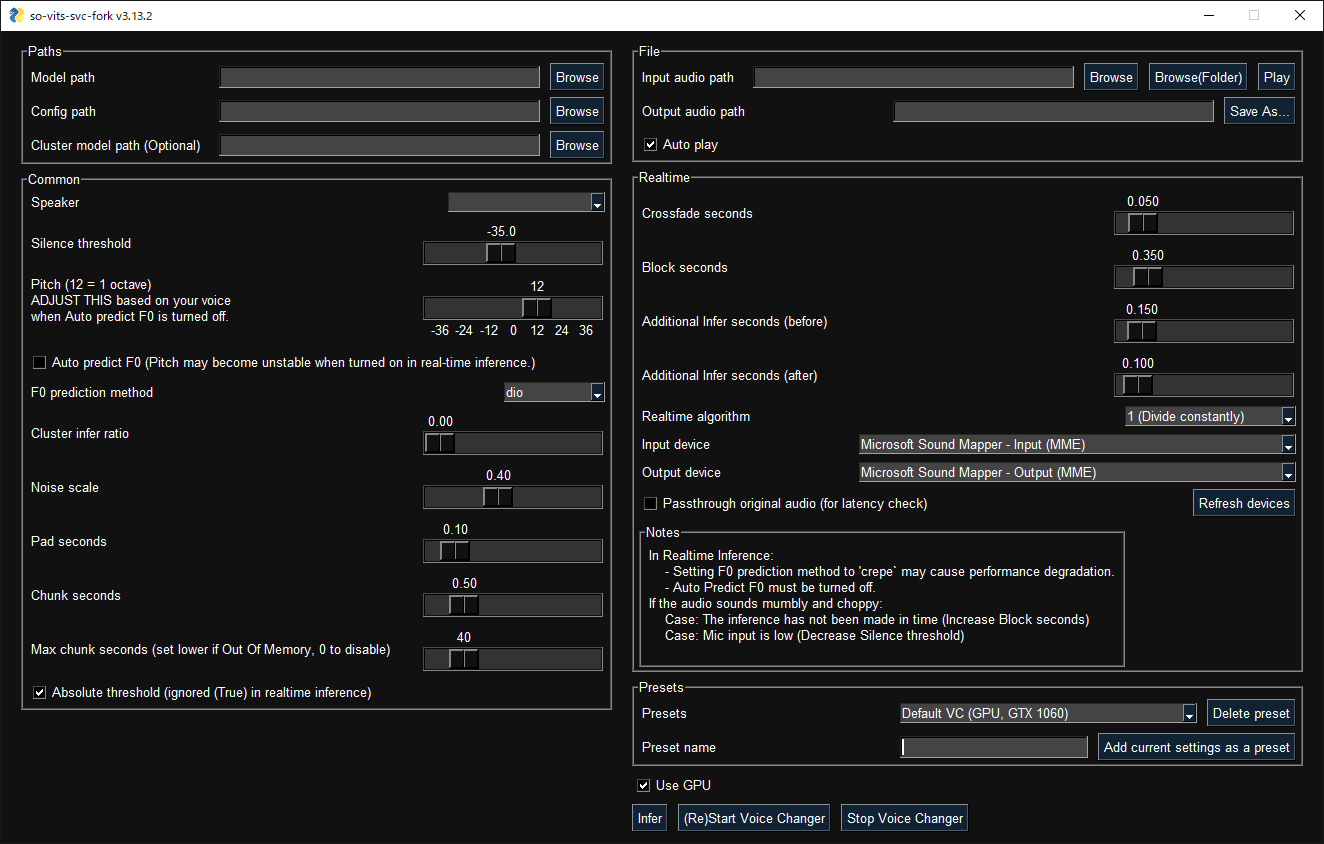
GUI launches with the following command:
svcg
CLI
Realtime (from microphone)
svc vc
File
svc infer source.wav
Pretrained models are available on Hugging Face or CIVITAI.
Notes
If using WSL, please note that WSL requires additional setup to handle audio and the GUI will not work without finding an audio device.
In real-time inference, if there is noise on the inputs, the HuBERT model will react to those as well. Consider using realtime noise reduction applications such as RTX Voice in this case.
Models other than for 4.0v1 or this repository are not supported.
GPU inference requires at least 4 GB of VRAM. If it does not work, try CPU inference as it is fast enough. [3]
Training
Before training
If your dataset has BGM, please remove the BGM using software such as Ultimate Vocal Remover.
3_HP-Vocal-UVR.pthorUVR-MDX-NET Mainis recommended. [1]If your dataset is a long audio file with a single speaker, use
svc pre-splitto split the dataset into multiple files (usinglibrosa).If your dataset is a long audio file with multiple speakers, use
svc pre-sdto split the dataset into multiple files (usingpyannote.audio). Further manual classification may be necessary due to accuracy issues. If speakers speak with a variety of speech styles, set –min-speakers larger than the actual number of speakers. Due to unresolved dependencies, please installpyannote.audiomanually:pip install pyannote-audio.To manually classify audio files,
svc pre-classifyis available. Up and down arrow keys can be used to change the playback speed.
Cloud


-9VJN74I-blue?style=flat-square&logo=paperspace)
If you do not have access to a GPU with more than 10 GB of VRAM, the free plan of Google Colab is recommended for light users and the Pro/Growth plan of Paperspace is recommended for heavy users. Conversely, if you have access to a high-end GPU, the use of cloud services is not recommended.
Local
Place your dataset like dataset_raw/{speaker_id}/**/{wav_file}.{any_format} (subfolders and non-ASCII filenames are acceptable) and run:
svc pre-resample
svc pre-config
svc pre-hubert
svc train -t
Notes
Dataset audio duration per file should be <~ 10s.
Need at least 4GB of VRAM. [5]
It is recommended to increase the
batch_sizeas much as possible inconfig.jsonbefore thetraincommand to match the VRAM capacity. Settingbatch_sizetoauto-{init_batch_size}-{max_n_trials}(or simplyauto) will automatically increasebatch_sizeuntil OOM error occurs, but may not be useful in some cases.To use
CREPE, replacesvc pre-hubertwithsvc pre-hubert -fm crepe.To use
ContentVeccorrectly, replacesvc pre-configwith-t so-vits-svc-4.0v1. Training may take slightly longer because some weights are reset due to reusing legacy initial generator weights.To use
MS-iSTFT Decoder, replacesvc pre-configwithsvc pre-config -t quickvc.Silence removal and volume normalization are automatically performed (as in the upstream repo) and are not required.
If you have trained on a large, copyright-free dataset, consider releasing it as an initial model.
For further details (e.g. parameters, etc.), you can see the Wiki or Discussions.
Further help
For more details, run svc -h or svc <subcommand> -h.
> svc -h
Usage: svc [OPTIONS] COMMAND [ARGS]...

  so-vits-svc allows any folder structure for training data.
  However, the following folder structure is recommended.
      When training: dataset_raw/{speaker_name}/**/{wav_name}.{any_format}
      When inference: configs/44k/config.json, logs/44k/G_XXXX.pth
  If the folder structure is followed, you DO NOT NEED TO SPECIFY model path, config path, etc.
  (The latest model will be automatically loaded.)
  To train a model, run pre-resample, pre-config, pre-hubert, train.
  To infer a model, run infer.

Options:
  -h, --help  Show this message and exit.

Commands:
  clean          Clean up files, only useful if you are using the default file structure
  infer          Inference
  onnx           Export model to onnx (currently not working)
  pre-classify   Classify multiple audio files into multiple files
  pre-config     Preprocessing part 2: config
  pre-hubert     Preprocessing part 3: hubert If the HuBERT model is not found, it will be...
  pre-resample   Preprocessing part 1: resample
  pre-sd         Speech diarization using pyannote.audio
  pre-split      Split audio files into multiple files
  train          Train model If D_0.pth or G_0.pth not found, automatically download from hub.
  train-cluster  Train k-means clustering
  vc             Realtime inference from microphone
External Links
Contributors ✨
Thanks goes to these wonderful people (emoji key):


This project follows the all-contributors specification. Contributions of any kind welcome!
Credits

This package was created with Copier and the browniebroke/pypackage-template project template.