Near-impossible to create a nuget package with WinUI 3 controls and resources #3546

Description

Describe the bug
When creating a C# class library and using the Pack target, the generated nuget package is incorrectly packing content files in a way where WAP packaged apps fail to build, and single-app projects fail to find resources.
Steps to reproduce the bug
- Unzip the sample project provided and open solution [PackagingBug.zip] (https://github.com/microsoft/WindowsAppSDK/files/11105641/PackagingBug.zip)
- Build
MyControlLibraryproject (simple custom control with an icon and custom font included with project) - Notice in output, a warning is displayed hinting at what is about to go wrong:
1>MyControlLibrary -> E:\sources.tmp\PackagingBug\MyControlLibrary\bin\Debug\net6.0-windows10.0.19041.0\MyControlLibrary.dll
1>C:\Program Files\dotnet\sdk\7.0.102\Sdks\NuGet.Build.Tasks.Pack\build\NuGet.Build.Tasks.Pack.targets(221,5): warning NU5118: File 'E:\sources.tmp\PackagingBug\MyControlLibrary\Assets\Icon.scale-200.png' is not added because the package already contains file 'content\Assets\Icon.scale-200.png'
1>C:\Program Files\dotnet\sdk\7.0.102\Sdks\NuGet.Build.Tasks.Pack\build\NuGet.Build.Tasks.Pack.targets(221,5): warning NU5118: File 'E:\sources.tmp\PackagingBug\MyControlLibrary\Assets\Icon.scale-200.png' is not added because the package already contains file 'contentFiles\any\net6.0-windows10.0.19041\Assets\Icon.scale-200.png'
- Run
ProjectRef_Test (Package)and verify the custom control works when using a project reference to the class library. You should see this:

- Build
NugetRef_TestApp. Notice the build errors:
1>C:\Program Files\Microsoft Visual Studio\2022\Enterprise\MSBuild\Current\Bin\amd64\Microsoft.Common.CurrentVersion.targets(5150,5): error MSB3030: Could not copy the file "E:\sources.tmp\PackagingBug\NuGet_Cache\mycontrollibrary\1.0.0\lib\net6.0-windows10.0.19041\MyControlLibrary\Themes\Generic.xbf" because it was not found.
1>C:\Program Files\Microsoft Visual Studio\2022\Enterprise\MSBuild\Current\Bin\amd64\Microsoft.Common.CurrentVersion.targets(5150,5): error MSB3030: Could not copy the file "E:\sources.tmp\PackagingBug\NuGet_Cache\mycontrollibrary\1.0.0\lib\net6.0-windows10.0.19041\MyControlLibrary\MyCustomControl.Theme.xbf" because it was not found.
1>C:\Program Files\Microsoft Visual Studio\2022\Enterprise\MSBuild\Current\Bin\amd64\Microsoft.Common.CurrentVersion.targets(5150,5): error MSB3030: Could not copy the file "E:\sources.tmp\PackagingBug\NuGet_Cache\mycontrollibrary\1.0.0\lib\net6.0-windows10.0.19041\MyControlLibrary\Assets\Icon.scale-200.png" because it was not found.
1>C:\Program Files\Microsoft Visual Studio\2022\Enterprise\MSBuild\Current\Bin\amd64\Microsoft.Common.CurrentVersion.targets(5150,5): error MSB3030: Could not copy the file "E:\sources.tmp\PackagingBug\NuGet_Cache\mycontrollibrary\1.0.0\lib\net6.0-windows10.0.19041\MyControlLibrary\Assets\calcite-ui-icons-24.ttf" because it was not found.
-
Instead build and run
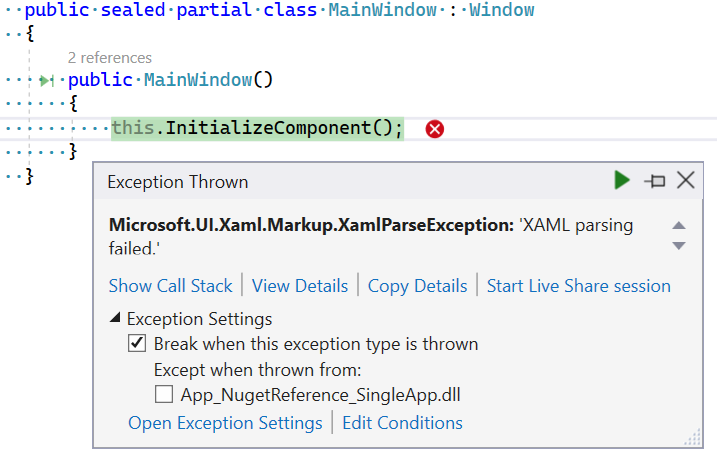
App_NugetReference_SingleAppwhich doesn't use a separate packaging project. This project builds, but will crash on launch with a very unhelpful error message:
-
We can work around the bug in Step 6, by modifying
MyControlLibrary.csprojand adding:

    <ItemGroup>
        <Content Update="Assets\*.*" PackagePath="lib\net6.0-windows10.0.19041\$(PackageId)\Assets\%(Filename)%(Extension)" />
    </ItemGroup>
This however, doesn't fix the problem. We are now instead met with the following build error:
2>C:\Program Files\Microsoft Visual Studio\2022\Enterprise\MSBuild\Current\Bin\amd64\Microsoft.Common.CurrentVersion.targets(5150,5): error MSB3030: Could not copy the file "E:\sources.tmp\PackagingBug\NuGet_Cache\mycontrollibrary\1.0.0\lib\net6.0-windows10.0.19041\MyControlLibrary\MyCustomControl.Theme.xbf" because it was not found.
2>C:\Program Files\Microsoft Visual Studio\2022\Enterprise\MSBuild\Current\Bin\amd64\Microsoft.Common.CurrentVersion.targets(5150,5): error MSB3030: Could not copy the file "E:\sources.tmp\PackagingBug\NuGet_Cache\mycontrollibrary\1.0.0\lib\net6.0-windows10.0.19041\MyControlLibrary\Themes\Generic.xbf" because it was not found.
At this point I have not been able to successfully create a nuget package with WinUI controls that has content files and works with both single-project and wap projects.
However even without the workaround in Step 8, if you open the generated nuget package, you'll see both a content and contentFiles folder, and the assets are in there, however are in the wrong folder, and should be pushed further down to include the package name, or the paths like ms-appx:///MyControlLibrary/Assets/... will not be correct since it is missing the package name. Again this can sort of be work around with this:
    <ItemGroup>
        <Content Update="Assets\*.*" PackagePath="contentFiles\any\net6.0-windows10.0.19041\$(PackageId)\Assets\%(Filename)%(Extension)" />
    </ItemGroup>
but again that doesn't really help that much, other than getting the content files deployed in the right location, but single-project app still crashes on launch.
Expected behavior
Generated nuget packages works and deploys files in the right folder.
Screenshots
No response
NuGet package version
Windows App SDK 1.2.5: 1.2.230313.1
Packaging type
Packaged (MSIX)
Windows version
Windows 11 version 22H2 (22621, 2022 Update)
IDE
Visual Studio 2022
Additional context
Note: I'm using a slight "hack" to get the sample apps use a locally built nuget-reference. Sometimes this causes restore errors, which can usually be handled by removing the obj folders in the app projects and rebuilding them, but sometimes it just wants a quick restart of VS to get it to snap out of it.
Additionally I had no luck using <PRIResource /> instead of <Content /> either (that even breaks the project reference version).